
Configuring Output Connections
Salesforce Output connectors enable you to write the results of a recipe to your Salesforce org for further analysis.
To configure output connection:
1.In Data Manager, click the Connections tab.
2.Click New Connection.
3.In Connector Type, click Output and select Salesforce Output Connector.
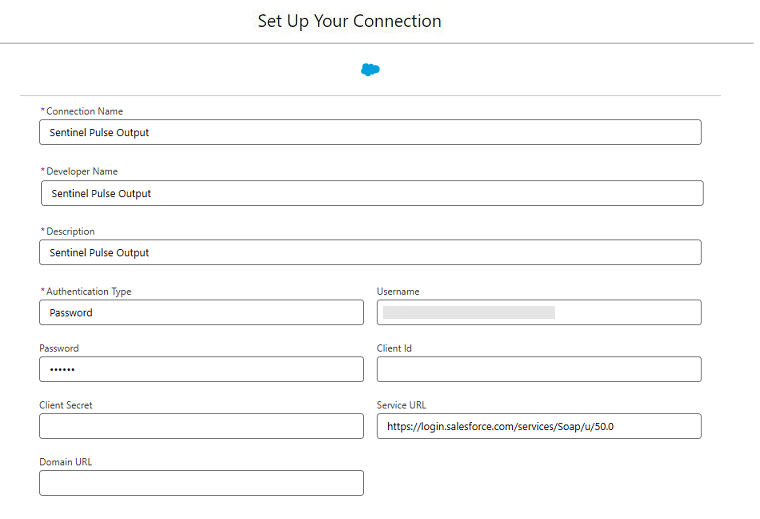
4.Define the Output Connection Settings in the Set Up Your Connection dialog box. The following image shows an example of the Set Up Your Connection screen.
5.Click Save & Test.
Before You Configure the Connection
To obtain the Client ID and Client Secret, you need to set up an External Client App (ECA) in Salesforce—a lightweight, Salesforce-specific mechanism to generate OAuth credentials (Client ID and Client Secret) so that Sentinel Pulse can securely authenticate its output connector without relying on a user's personal username and password. For details, refer to the section "Set Up an External Client App for OAuth" in https://help.salesforce.com/s/articleView?id=xcloud.sdp_connectors_output_salesforce.htm&type=5
Output Connection Settings
You must use the values from the following table to configure your output connector.
| Fields | Description | Values | Examples |
|---|---|---|
| Connection Name |
Identifies the connection. |
Sentinel Pulse Output |
| Developer Name |
API name for the connection. This name cannot include spaces. NOTE You cannot change the developer name after the connection is created. |
Sentinel_Pulse_Output |
| Description | Description for your connection. | Sentinel Pulse Output |
| Authentication Type | Specifies how the connection authenticates with Salesforce. | OAuth |
| The client ID for your OAuth connection. This value is the Consumer Key from your ECA. | <Your Consumer Key> For example: 3MVG9...xyzABC | |
| The client secret for your OAuth connection. This value is the Consumer Secret from your External Client App ECA. | <Your Consumer Secret> For example: A1B2C3D4E5F6... | |
|
Domain URL |
The My Domain URL for your external Salesforce org. In the external Salesforce org, go to My Domain in Setup. The URL format must be https://*.salesforce.com. | For example: https://mycompany.my.salesforce.com |
| Service URL |
Login URL for the external org. The default value uses the generic Salesforce login URL for your org. |
For example: https://login.salesforce.com/services/Soap/u/50.0 |
| For an added layer of security, update this field to use your org’s domain login URL. |
For example: A production org may use the format: |
After these settings are saved, you will get the following message on your screen:
Sentinel Pulse Output Salesforce Output Connector Connection have been created and tested successfully